From HTML to editable InDesign.HTML design in. Editable InDesign out.
Upload a self-contained .html design from Claude, ChatGPT or another tool. Get a native .idml with editable text, named styles and vector charts. Usually in under 30 seconds.
Two free conversions, up to two pages each. No account needed.
$49 once for unlimited full conversions.
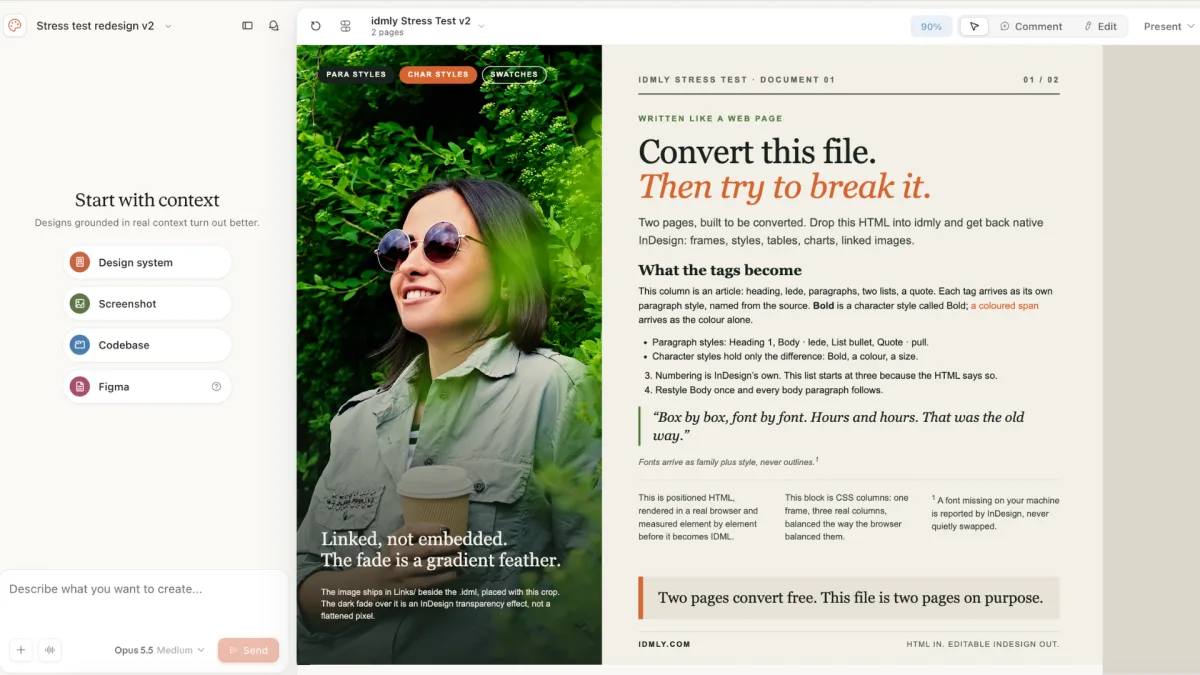
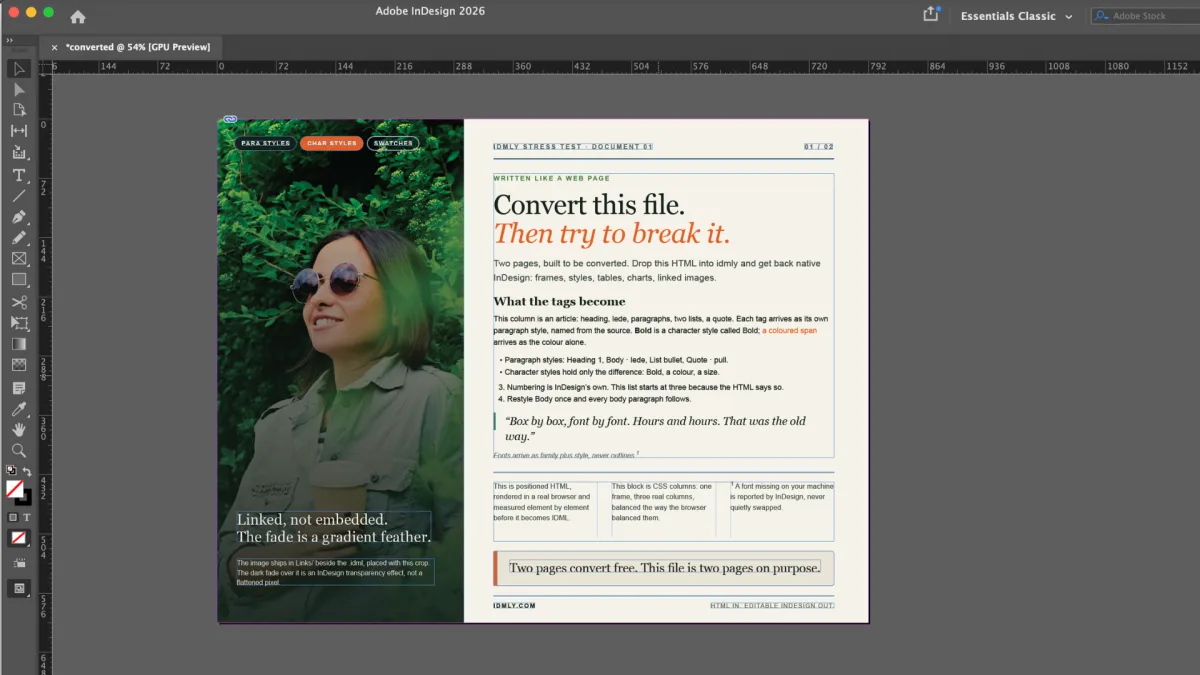
Your HTML layout → editable text, styles and linked images.
Watch a conversion · 25 seconds →
Drop a design. Get the .idml.
Upload a self-contained .html file. Try two conversions free, up to two pages each. A $49 lifetime license unlocks unlimited full-document conversions.
Paste a direct link to a hosted .html design (e.g. published to GitHub Pages or Vercel). A Claude or ChatGPT share link can't be fetched — download the .html and use the File tab instead. How this works →
Two free conversions per browser · up to two pages each · no account needed.
Your upload is deleted after conversion. No AI training. File privacy →
No .html file yet? How to export one from Claude, ChatGPT or Figma Make →
Try the two-page example shown here.
Download our stress-test HTML and drop it above to try a conversion. Or inspect its ready-made InDesign file without using a free conversion.
For the IDML sample, unzip it and keep the Links folder beside the .idml, then open it in InDesign.
How do I get an HTML file from my AI tool?
Ask it for a single, self-contained HTML file of your design, then download the .html file. Open it in your browser to check the layout before uploading. A screenshot, PDF or Claude/ChatGPT share link cannot be uploaded directly.
- Claude — open the design and use its Download button. Don’t “Save page as” from the browser: that copy often doesn’t finish unpacking and won’t convert.
- ChatGPT — ask for “one self-contained .html file with the CSS inline”, then download it from the canvas or the code block.
- Figma Make, v0, Lovable, Bolt — export or download the page as HTML. If it opens in your browser and looks right, it’s ready.
Pick this up in InDesign on your computer.
Email yourself a link to the free converter, then upload your HTML design when you’re at your desk.
Email yourself a link to finish on a desktop
Paste the license key from your purchase email, then drop your file — it'll convert in full.
Get a license — $49 → Your key always lives in your purchase email — paste it on any browser, even after clearing your cache or switching devices. No re-buying. Lost it? support@idmly.comSend us the file and we'll fix what broke. It goes straight to a human, nowhere else.
The .html design file you converted, by email, to the person who builds this.
Drop your file
The AI-generated design bundle you already made.
It converts
Native InDesign markup. Fonts bound, styles named, charts redrawn as real vectors.
Open and keep designing
A clean .idml. Activate the fonts it lists, and everything’s editable. No rebuild.
From your AI agent to editable InDesign.
Keep creating in your AI tool. When the HTML design is ready, ask it to export an InDesign file. idmly handles the conversion, so you can start refining the design instead of rebuilding it.
Works with Claude Code, Cursor, Codex, Windsurf and Claude Desktop.
Try two pages free. No license key needed.
Your $49 lifetime license covers the website and MCP.
Create in your AI tool
Make your report, presentation or editorial layout as a self-contained HTML file.
Ask for the InDesign file
Convert this HTML design to an editable InDesign file with idmly.
Open it. Make it yours.
Refine real text frames, named styles, editable vector charts and linked images in InDesign.
Let your AI tool help with setup.
Copy this prompt into your AI chat. It will read the idmly setup guide and help you connect.
Read https://www.idmly.com/SKILL.md and help me connect idmly to my AI tool so I can export HTML designs as editable InDesign files.
Need team seats or conversions at volume? Get in touch.
Less rebuilding. More time for great design.
You’ve got the idea. Getting it into InDesign shouldn’t take hours of recreating boxes, matching fonts, and nudging everything into place.
Cut the repetitive work so you can spend more of your day refining the details, exploring better ideas, and getting designs out the door.
More finished work. The same high standards.
Tables you can edit. Charts you can reshape.
See the data page before and after conversion. InDesign’s blue frame edges reveal the text, table cells and individual vector objects.
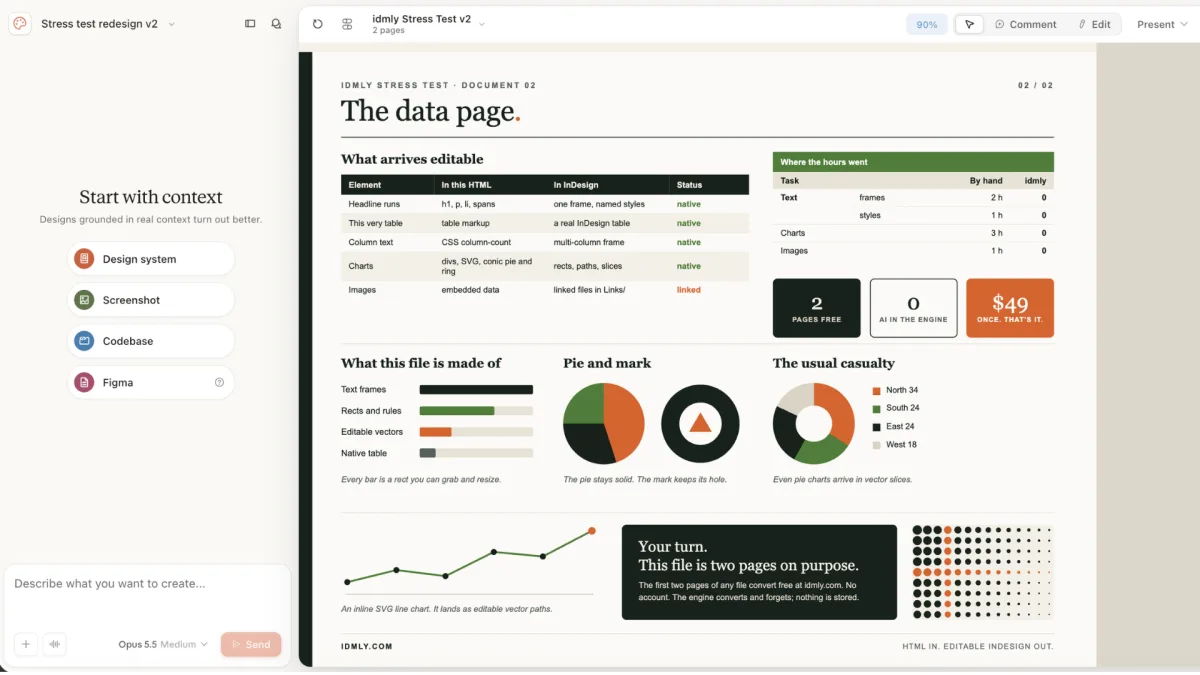
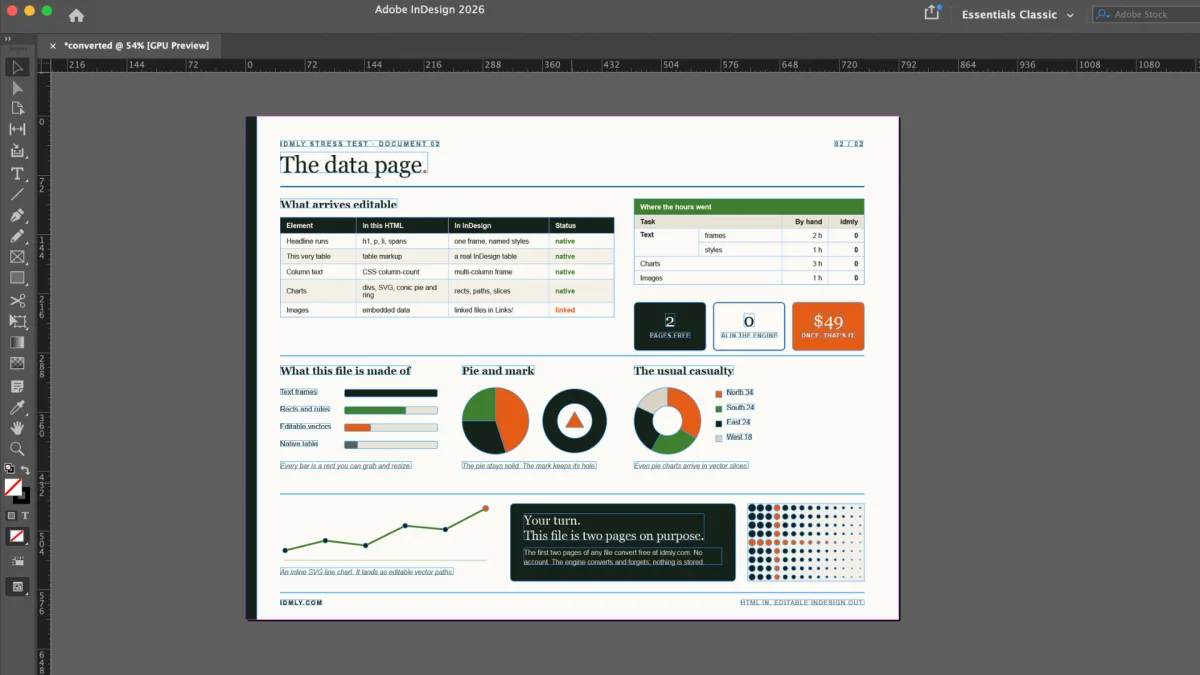
Inspect the result yourself. Download the matching HTML and IDML files →
An .idml, not a PDF with movable boxes.
.idml file you keep working in.One license. No subscription.
One number, once — and it's less than an hour of rebuilding by hand.
“Your software has been amazing at taking our work and turning it into beautiful layout files in InDesign. You don’t know the stress this has removed.”
“This is a really helpful tool.”
“Just purchased the license to idmly and I think it’s going to be money extremely well spent!”
Using it from Claude or another AI tool? How the key goes in
claude.ai or Claude Desktop (no local install): Customize → Connectors → Add custom connector. URL https://idmly-production.up.railway.app/mcp, Authentication No sign-in, then under Request headers choose authorization and enter Bearer <your key>: the word Bearer, a space, then your key. Claude sends the value exactly as typed. No Request headers section in your dialog? That beta hasn't reached your account yet; use the local server below.
Claude Code, Cursor, Windsurf, Codex (local server): claude mcp add idmly -e IDMLY_LICENSE_KEY=<your key> -- npx -y idmly-mcp, or set IDMLY_LICENSE_KEY in the server's config. Full setup for every client →
14 days: if your file won’t convert, we’ll fix it or refund you. Refund terms →
License key emailed after checkout · Local tax may be added at checkout · Payment handled by Creem.io.
Questions designers actually ask.
What do I get back?
.idml that opens straight in Adobe InDesign: real text frames, named paragraph and character styles, charts and tables as editable objects, images placed and linked. If your design has images, it arrives as a zip — keep the Links folder next to the .idml. The file also opens in Affinity Publisher.What do I upload?
.html file — the kind AI tools hand you when they design a report, deck, or one-pager. If it opens in your browser and looks like your design, it's ready to convert.Is my design private?
What if the conversion isn’t right?
My headings opened as scrambled characters. Is the file broken?
.idml is intact; your InDesign is drawing it with a mismatched font. The cause we've seen: two versions of the same typeface active at once, usually one from Adobe Fonts and a newer copy installed from Google Fonts. InDesign pairs one version's character map with the other's outlines, so a heading reads like ĔįõỸ while the body text, set in a different font, looks fine. To check, type a line in that font in a blank InDesign document: if it scrambles there too, it's the font setup, not the conversion. To fix it, keep one copy — deactivate the family in Creative Cloud under Fonts, or remove the local files — then reopen the .idml. Quick workaround: put the font files in a folder named Document Fonts next to the .idml; InDesign uses those first.Can I convert HTML or CSS to InDesign?
.html design and get back a native .idml: editable text frames, named styles, and charts as real vector objects. Not a flattened PDF. Full guide and method comparison →Can idmly convert a Claude or ChatGPT design into InDesign?
.idml: real text frames, named styles, charts as editable vectors. It doesn't matter which AI tool produced the HTML. Full guide →Is this the same as the Claude → InDesign MCP connector (Sidekick/Duet/Adobe)?
.idml file, and it now ships its own MCP server, so your agent can hand the file over itself. Many people use both — generate in Claude, convert with idmly, then refine in InDesign.Which AI design tools does idmly work with?
.html that opens in a browser, it converts.